

« Fixing “/usr/lib/cups/backend/smb failed” error in Ubuntu | Home | Paint.NET on Ubuntu Linux 9.10 »
Sound in Windows 98 on VMware
By admin | February 27, 2010
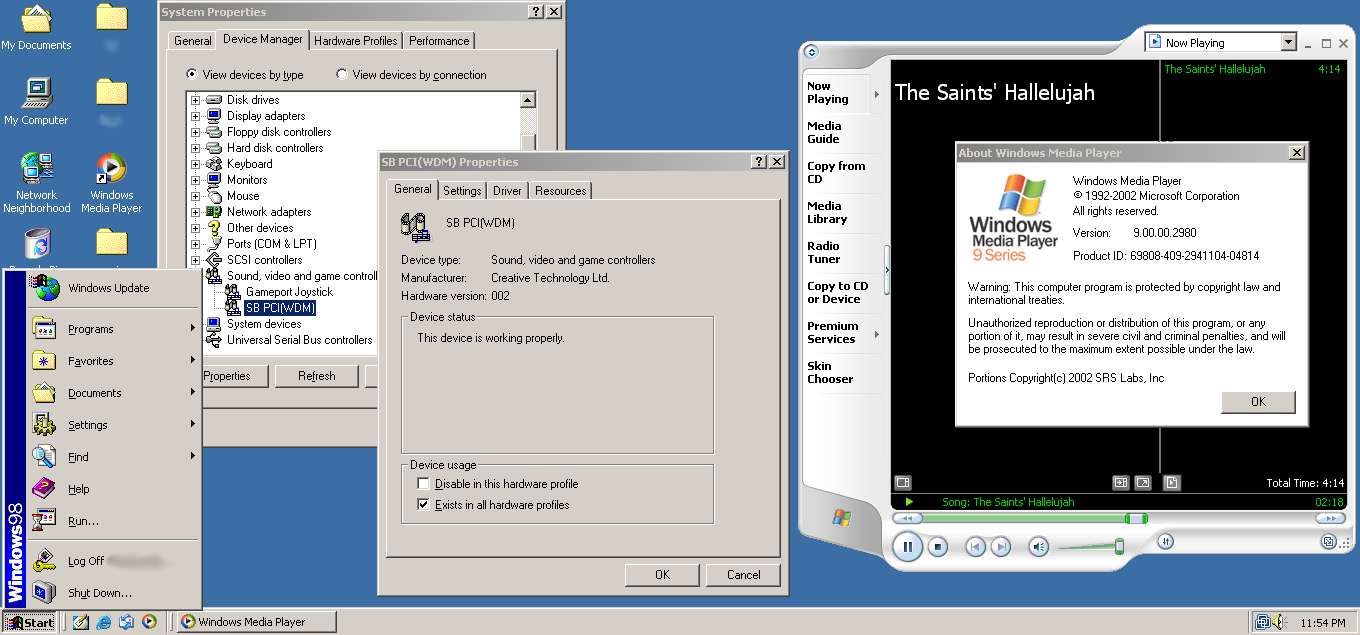
Windows 98 Sound in VMware
By default, even after installing the VMWare Tools provided by VMWare (Player, Workstation or Server), the VMWare Tools package still does not install an audio driver, even though it installed a mouse driver and a SVGA driver for true colour graphics. However, most of the time we would like some audio in Windows 9x guests, whether to test old Win9x applications or to have a copy of Windows to run Windows-only software that refuses to run under Linux or Wine.
Requirements
- DirectX 9.0 (important, very important, without it you’ll get the dreaded NTKERN.VXD and MMDEVLDR.VXD errors)
- Creative Ensoniq AudioPCI drivers (the card emulated by VMware)
- eapci8m.ecw (if you want to play MIDI files), backup download
- Windows 9x (98 FE or SE, but should work on all versions of Windows) running in…
- A VMWare product (any, be it Server, Player or Workstation) with VMWare Tools installed.
Steps
- Run SBPCI_WebDrvsV5_12_01.exe and install it, but do not reboot.
- Move eapci8m.ecw to C:\windows\system.
- Install DirectX 9 (directx_9c_redist.exe).
- Now restart the system.
- After logging in, sound should start working. Enjoy!
Troubleshooting The NTKERN.VXD and MMDEVLDR.VXD device loader(s) for this device could not load the device driver. (Code 2)
This error message results because the code used by Creative Technology, Inc uses APIs from DirectX or other supporting libraries that are not incuded by default with Windows 98. Installing the DirectX 9 package did however fix the problem.
If you found this article helpful or interesting, please help Compdigitec spread the word. Don’t forget to subscribe to Compdigitec Labs for more useful and interesting articles!
Topics: Windows | 32 Comments »
March 13th, 2010 at 13:08
I’m trying to set up VMPlayer to play some old Windows 98 games on 64-bit Vista. Was having some trouble getting the sound to work. This guide worked perfectly, thank you.
August 19th, 2010 at 09:07
works perfect
September 5th, 2010 at 17:46
Dude, you are the freaking man! How the hell did you figure this out?
November 1st, 2010 at 19:54
ok FINE!!!!
if the step 1 causes an error, install directx9, first.
January 23rd, 2011 at 00:42
This works great for Windows XP on VMware as well, although on windows xp you probably already have directx9. I imagine it would also work great for windows 2000.
Thanks so much!
January 24th, 2011 at 22:41
After much frustration trying different solutions, this worked perfectly. Thanks !
March 11th, 2011 at 06:19
Can someone please help me?
I installed the sound drivers, DX and VM tools. Everything seems to work perfectly. I’ve got sound and high resolution display. But when I start a game (I tried Dungeon Keeper and NFS2SE), it turned to be very choppy and the computer responds only every few seconds. And when it does respond, it was very fast. It’s like a rush, freeze, rush, freeze cycle. The graphics are reduced to 16bit and there was no sound. I’m running VMWare 7.1.3 on Windows 7 64bit, and my VM is a Windows 98 SE.
March 19th, 2011 at 11:11
Have you tried turning on the graphics acceleration in Windows 98 to full, and closing all other programs (other than VMWare in your host)?
The specifications of your host computer might also make a difference.
August 11th, 2011 at 05:01
“THUMPS UP !”
Perfect instructions, by the end, IT WORKS ON WIN XP too !!
December 26th, 2011 at 01:18
Disculpa pero ahi dices ejecutar
SBPCI_WebDrvsV5_12_01.exe
pero donde esta ese archivo o donde lo conseguimos. Te agradecere la informacion.
Tambien tengo problema que no se actualiza mi MVware.aunque puedo ver paginas pero no se puede actualizar tools ni el programa, porque sera?
January 2nd, 2012 at 20:41
@mike:
SBPCI_WebDrvsV5_12_01.exe is the Creative Ensoniq AudioPCI driver, and can be found from the Creative site e.g.
http://support.creative.com/Products/ProductDetails.aspx?catID=1&subCatID=207&prodID=420&prodName=Ensoniq%20AudioPCI&subCatName=Others&CatName=Sound+Blaster
June 17th, 2012 at 16:00
Thanks thanks thanks thanks!! You’re awesome! I thought I’d never get the audio working, but thanks to you, now I have 🙂
December 19th, 2012 at 04:20
Super, die Anleitung stimmt. Die Tonprobleme sind Geschichte. Danke!
December 21st, 2012 at 19:54
Seriously, awesome solution. Got it working in 1 go with this :).
May 6th, 2013 at 20:47
I can dl files fine to my host, but how do I get them to Windows 98 exactly?
May 11th, 2013 at 01:13
@Jon:
VMware should have virtual network adapter drivers provide Internet access for Windows 98 inside VMware. Then use your usual Samba shares to pull the file inside.
October 17th, 2014 at 16:31
After a few restarts it’s working beautifully, thank you 🙂
November 9th, 2014 at 13:11
[…] quickly I found this manual, but sound still doesn’t appear. Next I found KB article for VMWare hardware compatibility. […]
February 12th, 2015 at 04:27
I first followed instructions to download drives at creative and got epw9xup.exe (998576 bytes) this works but will nag you about midi at each restart. Searching again I found this with SBPCI_WebDrvsV5_12_01.exe (4842060 bytes) removed driver and reistalled using this with great success. With this driver sound works fine and no nag. Thank you.
March 6th, 2017 at 18:48
Worked flawlessly with VM Workstation Player 12 and Windows 98 Second Edition. Lifesaver!
January 12th, 2018 at 08:16
Many thanks!
AFAIK the only right method on the Web.
February 11th, 2019 at 19:34
The provided driver will not work on Windows 98 First Edition. When you try to run SBPCI_WebDrvsV5_12_01.exe, a message appears stating “Your version of Windows Operating System is not supported by this product. Please upgrade to Windows 98 Second Edition or later versions before resuming installation.”
This message appears regardless of whether you install Direct X first or last.
November 18th, 2021 at 11:12
It works ! good job…
July 1st, 2026 at 23:41
… [Trackback]
[…] Information to that Topic: compdigitec.com/labs/2010/02/27/sound-in-windows-98-on-vmware/ […]
July 8th, 2026 at 09:05
… [Trackback]
[…] There you will find 14062 more Information to that Topic: compdigitec.com/labs/2010/02/27/sound-in-windows-98-on-vmware/ […]
July 22nd, 2026 at 08:09
… [Trackback]
[…] Find More on that Topic: compdigitec.com/labs/2010/02/27/sound-in-windows-98-on-vmware/ […]
July 24th, 2026 at 20:04
… [Trackback]
[…] Read More here to that Topic: compdigitec.com/labs/2010/02/27/sound-in-windows-98-on-vmware/ […]
August 9th, 2026 at 05:27
… [Trackback]
[…] Info to that Topic: compdigitec.com/labs/2010/02/27/sound-in-windows-98-on-vmware/ […]
August 14th, 2026 at 05:56
… [Trackback]
[…] Here you can find 71240 additional Info to that Topic: compdigitec.com/labs/2010/02/27/sound-in-windows-98-on-vmware/ […]
September 2nd, 2026 at 18:13
… [Trackback]
[…] There you will find 4325 additional Information on that Topic: compdigitec.com/labs/2010/02/27/sound-in-windows-98-on-vmware/ […]
September 8th, 2026 at 19:52
… [Trackback]
[…] Information on that Topic: compdigitec.com/labs/2010/02/27/sound-in-windows-98-on-vmware/ […]
September 11th, 2026 at 01:34
… [Trackback]
[…] Find More here to that Topic: compdigitec.com/labs/2010/02/27/sound-in-windows-98-on-vmware/ […]